Chapter 10 — Agentic Experience (AX): UX for Agentic AI
TL;DR
- Agent UX is fundamentally trust engineering — the primary adoption barrier is not capability but the perception of dependability, which must be designed in through controls, evidence, and recovery paths.
- The field is shifting from traditional UX to Agent Experience (AX), a design discipline that accounts for non-deterministic behavior, delegated authority, and multi-party oversight.
- Core AX patterns include surface selection (matching UI to trigger type), autonomy controls (visible, switchable, evidence-gated modes), preview-commit (splitting propose from apply for every write), the explanation ladder (progressive disclosure from inline rationale to full trace), and provenance (citations and source-of-truth cues for every claim).
- When agents fail, the UX must provide typed recovery — classifying errors, preserving state, and offering concrete next steps instead of forcing a restart.
- UX teams must own a complementary evaluation layer covering trust, momentum, and sentiment — because engineering accuracy alone does not produce the user confidence needed for real-world adoption.
Agentic experience design is the art of making a probabilistic system feel dependable.
A good agent is not only "smart". It is also:
- Legible: users can see what it is doing and why.
- Controllable: users can shape autonomy, approvals, and rollback.
- Recoverable: when it fails, the path to correction is obvious.
- Auditable: actions, evidence, and outcomes are traceable end-to-end.
This chapter translates those goals into practical UI patterns. For each pattern, it lists what to test in your evaluation harness.
Running example: HR Leave Agent (see Chapter 4 for introduction, Chapter 14.2 for complete case study)
10.0 Why UX for agentic apps is different
The primary adoption barrier for agentic AI is not capability — it is trust. Deloitte found that only 2.7% of finance professionals trust agents for judgment calls. Forrester reports 54% of consumers are uncomfortable with AI data sharing. Gartner predicts that more than 40% of agentic AI projects will be canceled or scaled back by 2027. These numbers share a single root cause: agents that are technically capable but experientially untrustworthy.
This makes agentic UX design fundamentally trust engineering. John Maeda frames this shift as the emergence of "Agent Experience" (AX) — a successor to UX that accounts for non-deterministic behavior, delegated authority, and multi-party oversight. Throughout this chapter, we use AX to describe the full design discipline: not just the screens, but the controls, evidence, handoffs, and recovery paths that make an agent trustworthy enough to deploy.
Most software UX assumes deterministic execution. The system either follows the flow or throws an error. Agentic systems behave differently. They interpret intent, plan, call tools, self-correct, and sometimes hallucinate, overreach, or stall.
The UX job is not to "make a chat box". The UX job is to wrap a probabilistic core with deterministic shells:
- deterministic controls (approvals, step limits, kill switch)
- deterministic contracts (tool schemas, permissions, idempotency)
- deterministic evidence (traces, provenance, action logs)
- deterministic recovery (undo, compensation, escalation paths)
Figure 9.1 — Probabilistic core, deterministic shells
flowchart TB
  subgraph CORE[Probabilistic core]
    I[Interpret intent]
    P[Plan steps]
    A[Act via tools]
    J[Judge outcome]
  end

  subgraph SHELLS["Deterministic shells (exposed in UX)"]
    direction LR
    C1[Controls:<br/>autonomy, approvals,<br/>kill switch]
    C2[Contracts:<br/>schemas, RBAC,<br/>idempotency]
    C3[Evidence:<br/>provenance, trace,<br/>action log]
    C4[Recovery:<br/>undo, compensate,<br/>escalate]
  end

  CORE --> SHELLS
Caption: The model can be probabilistic, but the product must behave predictably through controls, contracts, evidence, and recovery.
10.0.1 Why single metrics fail for agent UX
Traditional software UX can often be measured with a single north-star metric — task completion rate, time-on-task, or error rate. Agent experiences break this assumption because they fail along multiple axes simultaneously. An agent response can be factually correct but unhelpful, polite but procedurally wrong, or following the right process while frustrating the user.
This means engineering-led evaluation (accuracy, tool correctness, latency) is necessary but insufficient. Correctness alone does not produce trust. UX teams must own a complementary evaluation layer that covers conversation quality, task momentum, and user perception. Product connects both evaluation streams to the roadmap.
📚 Related sections: - Evaluation foundations → Chapter 6 - Evaluation in practice → Chapter 7
10.1 From "chat box" to structured agent UX
A single text box is a great universal input. It is not a universal product.
Chat works best when the task is exploratory, the cost of mistakes is low, and the user can quickly correct the agent. As soon as you have high-impact writes, multi-party approvals, queues, SLAs, or audit needs, you typically need structured surfaces.
⚠️ Prerequisites: Review Chapter 3, §3.9 (UX principle).
📚 Related sections: - User research → Chapter 7, §7.5 - Trust and adoption → Chapter 14, §14.6.3
Pattern card 10.1A — Trigger → Surface taxonomy
Intent
Select a UX surface that matches how work arrives and how it is governed.
When to use
Use this pattern when starting a new agent product and you want to avoid defaulting to "chat-only". It also applies when you have more than one trigger type (human, event, schedule) or need to support both "do work" and "operate the system".
Figure 9.2 — Trigger → Surface selection tree
flowchart LR
  T[Work arrives] --> H{Human initiated?}
  H -- Yes --> R{High impact write?}
  R -- No --> Chat[Conversational workspace<br/>+ sidecar]
  R -- Yes --> W[Wizard or Form<br/>+ Preview→Commit]

  H -- No --> E{Event triggered?}
  E -- Yes --> Q[Queue / Inbox<br/>+ Exception handling]
  E -- No --> S{Schedule driven?}
  S -- Yes --> D[Dashboard<br/>+ Alerts + Controls]
  S -- No --> M[Hybrid surface<br/>based on governance]
Caption: Don't choose the UI by taste. Choose it by trigger type and action risk.
Table 9.1 — UX patterns by trigger and surface
| UX pattern | Typical trigger | Primary surface | Best for | Examples |
|---|---|---|---|---|
| Conversational workspace + sidecar | human-initiated | chat plus panels | exploration, clarification, drafting | Contract review, CRM drafting |
| Embedded copilot sidebar | human-initiated in an existing app | sidebar, inline suggestions | augmentation without UI takeover | CRM, Contact centre console |
| Wizard / guided flow | human-initiated | multi-step form | bounded workflows, clean audit | HR leave, Scheduling requests |
| Queue / inbox | event-triggered | list + detail panel | triage, exceptions, approvals | IT service desk, Invoice processing |
| Dashboard + alerts | schedule-driven, ops-driven | metrics, notifications | drift, anomalies, throughput | all production agents |
What to test (harness hooks)
For each trigger type, run scenario suites that verify correct routing to the surface and correct case state. Test that audit trails are created properly. Verify safe behavior when inputs are incomplete or ambiguous.
Worked examples
- HR Leave: wizard for request capture, approval queue for managers.
- IT Service Desk: queue-first triage, then conversational deep dive.
- Invoice: inbox for exceptions, dashboard for aging and drift.
- Contact centre: embedded sidebar in agent console, strong provenance.
- CRM: copilot sidebar for drafting, strict "preview then commit".
- Contract review: conversation plus clause-level checklist.
- Scheduling: guided flow plus what-if simulation.
10.1.1 The emerging AX design vocabulary
A practitioner-ready design vocabulary is crystallizing around agentic interfaces. These frameworks complement the trigger-surface taxonomy above by naming the interaction patterns that recur across agent products.
Agent Cards (World Economic Forum) standardize capability disclosure. An Agent Card declares what an agent can do, what data it accesses, what actions it can take, and what oversight is in place — analogous to a nutrition label for agent capabilities. Agent Cards support the transparency principle (§10.5) and help users calibrate trust before the first interaction.
Yocco's six-pattern lifecycle provides a structured progression through an agent interaction:
- Intent Preview — surface what the agent understood before acting
- Action Proposal — show planned steps with evidence
- Execution Monitoring — make progress and tool calls visible
- Outcome Verification — confirm results with the user
- Correction Affordance — enable edits and rollback
- Escalation Pathway — clear route to human takeover
These six patterns map directly to the chapter's core surfaces: Intent Preview and Action Proposal to Preview→Commit (§10.4), Execution Monitoring to the explanation ladder (§10.5), Correction Affordance to exception handling (§10.7), and Escalation Pathway to inbox triage (§10.6).
Salesforce's player/coach/referee model clarifies agent roles in collaborative workflows. The agent can act as a player (executing tasks), a coach (advising humans), or a referee (enforcing policy). The same agent may shift between roles within a single workflow — executing routine steps, coaching on exceptions, and enforcing compliance constraints. This model maps to the autonomy modes in §10.3: player corresponds to execute-automatically, coach to suggest-only, and referee to runtime policy enforcement.
From chat to orchestration. Both Wroblewski and Friedman emphasize that the most impactful AX work ahead lies not in conversational polish but in orchestration-centric interfaces: task queues, progress visualization, undo architectures, and multi-agent coordination surfaces. The trigger-surface taxonomy in Table 9.1 reflects this shift — four of the five surface types are structured, non-chat interfaces.
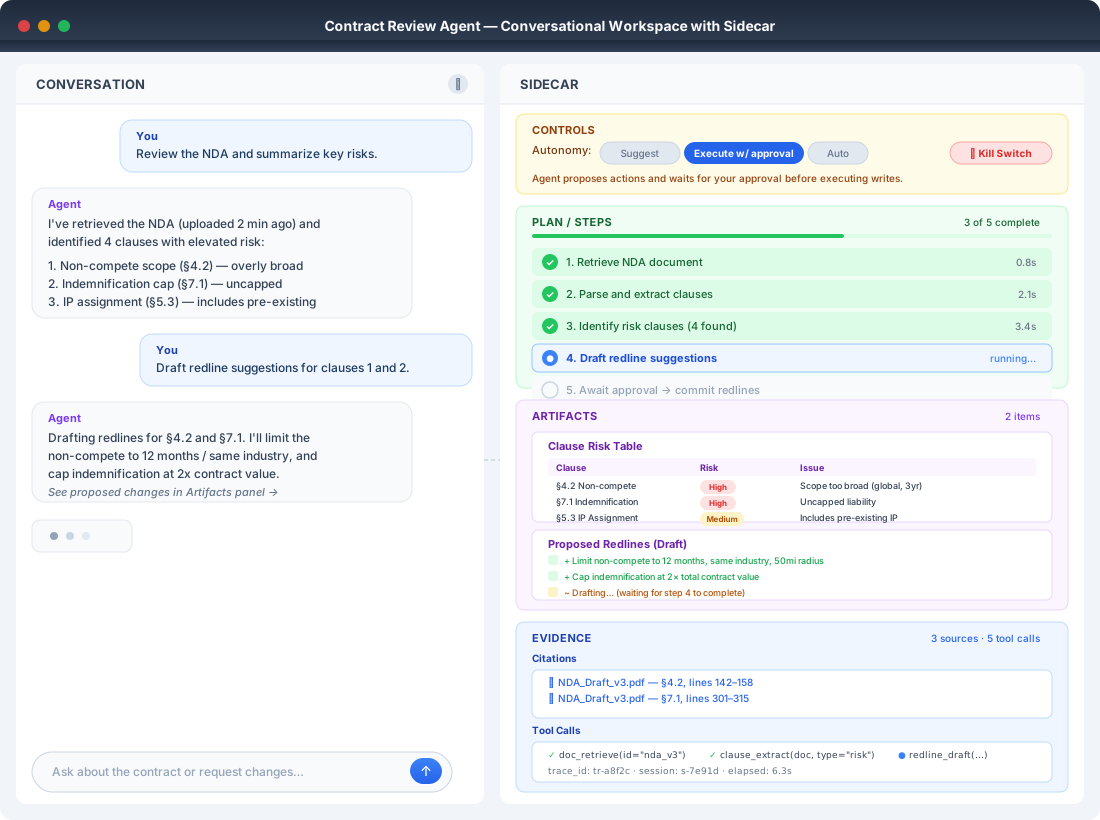
10.2 Pattern: Conversational workspace with a sidecar
Intent
Keep chat as the input modality. Do not make it the only output modality.
When to use
This pattern fits contract review, CRM drafting, and contact centre assistance. Use it in any domain where you need citations, structured fields, and action controls.
Figure 9.3 — Sidecar workspace anatomy
flowchart LR
  subgraph LEFT[Conversation]
    U[User intent & clarifications]
    M[Agent responses]
    U <--> M
  end

  subgraph RIGHT[Sidecar panels]
    P[Plan / Steps<br/>status, next action]
    A[Artifacts<br/>forms, drafts, checklists]
    C[Controls<br/>mode, approvals, undo]
    E[Evidence<br/>citations, tool logs, trace]
  end

  M --> P
  M --> A
  M --> E
  C --> M
Caption: Chat is the interaction layer. The sidecar is where the product becomes operable, safe, and auditable.
Lightweight wireframe (copy-paste friendly)
+---------------------------+------------------------------+
| Conversation              | Sidecar                      |
|--------------------------|------------------------------|
| User: summarize risks     | Autonomy: Execute w/ approval|
| Agent: ...                | [Toggle] [Kill switch]       |
|                           |------------------------------|
|                           | Plan / Steps                 |
|                           | 1) Retrieve clauses ✅        |
|                           | 2) Identify risks ⏳           |
|                           | 3) Propose redlines ⏳         |
|                           |------------------------------|
|                           | Artifacts                    |
|                           | - Clause table (risk tags)   |
|                           | - Suggested edits            |
|                           |------------------------------|
|                           | Evidence                     |
|                           | - Citations + links          |
|                           | - Tool calls / trace         |
+---------------------------+------------------------------+
Polished wireframe
Runtime requirements
The scaffold must emit plan and step status, plus structured artifact objects. The runtime must support preview and commit, permission checks, and trace storage.
What to test
Verify that every tool call appears in the action log. Confirm every artifact has provenance links. Test that switching autonomy modes changes behavior immediately and predictably.
Worked example: Contract review
- Artifacts: clause table with risk tags, suggested edits, citations
- Controls: export redlines, request legal approval for high-risk changes
10.3 UX that makes autonomy and oversight explicit
Autonomy is not an internal setting. It is a product promise.
📚 Related sections: - Autonomy levels → Chapter 2, §2.6 - Oversight principle → Chapter 3, §3.7 - Progressive autonomy in production → Chapter 11, §11.2
The field is converging on mixed-initiative interaction as the dominant paradigm for agentic systems. Full autonomy is rejected in favor of carefully designed handoff moments:
- CMU's Morae framework implements proactive pausing — the agent identifies decision points and surfaces them to the user before proceeding, rather than waiting for the user to interrupt.
- CHI 2025's Human-AI Deliberation research replaces binary accept/reject with iterative discussion. The user and agent negotiate the action through a structured exchange, producing better outcomes than either unilateral human or autonomous agent decisions.
- The IUI 2025 mixed-initiative workshop synthesizes this consensus: the design challenge is not whether to include human oversight but precisely when and how to surface it.
The risk of poorly designed handoffs is what practitioners call "agentic sludge" — unnecessary friction that makes human oversight feel like bureaucracy rather than collaboration. Every approval gate, confirmation dialog, and review step must earn its place. The test: does this handoff improve the outcome, or does it merely create the appearance of control? If users rubber-stamp approvals because they add no value, the oversight is sludge — it degrades both trust and momentum without reducing risk.
10.3.1 Why autonomy visibility builds trust
Trust forms when users believe "this agent is acting with my best interests in mind." That belief does not come from accuracy alone — it comes from the agent making its intentions, constraints, and actions legible. When autonomy is visible, users can verify intent. When it is hidden, even correct behavior feels suspicious.
High trust changes how users interpret mistakes: errors are treated as exceptions rather than evidence of failure. Low trust does the opposite — a single wrong answer collapses confidence and triggers constant verification. Visibility is the mechanism that builds and sustains trust over time.
Pattern card 10.3A — Make autonomy visible and switchable
Autonomy modes
- Suggest-only: agent drafts, human executes
- Execute-with-approval: agent prepares actions, waits for approval
- Execute-automatically: agent commits within permission boundaries
Figure 9.4 — Autonomy ladder with evidence gates
flowchart TB
  S[Suggest-only] -->|Earned by<br/>stable offline evals| A[Execute-with-approval]
  A -->|Earned by<br/>low override rate +<br/>incident-free canary| X[Execute-automatically]

  S -.->|If failures spike| A
  A -.->|If failures spike| S
  X -.->|If drift or incidents| A

  subgraph Evidence[Evidence gates]
    E1[Offline regression suites<br/>rubrics, golden cases]
    E2[Shadow mode<br/>human override rate]
    E3[Canary rollout<br/>incidents, rollback rate]
  end
Caption: Autonomy should be earned with evidence, and downgraded automatically when risk signals spike.
Runtime requirements
Define action classes for read, write, and high-impact write operations. Enforce approval policy in runtime, not only in prompts. Set step and retry budgets so "auto" is still bounded.
What to test
Run mode transition tests to confirm the same input yields different allowed actions depending on mode. Test high-impact writes to ensure auto mode still blocks forbidden actions. Verify audit tests store mode-at-time-of-action with the trace.
Worked examples
- CRM: suggest-only drafts notes, approval mode creates tasks, auto only schedules low-risk reminders
- IT Service Desk: auto password reset under strict policy, approval for config changes
10.3.2 Autonomy Level Selection Guide
Use this flowchart to determine the appropriate autonomy level for an agent action.
flowchart TD
    START([Action to evaluate]) --> Q1{Is the action<br/>reversible?}

    Q1 -->|No, permanent| Q2{What is the<br/>blast radius?}
    Q1 -->|Yes, can undo| Q3{What is the<br/>error cost?}

    Q2 -->|High: financial, legal, safety| HITL1[HITL: Human approves every action]
    Q2 -->|Medium: workflow disruption| HOTL1[HOTL: Human reviews samples + exceptions]
    Q2 -->|Low: minor inconvenience| Q3

    Q3 -->|High: trust loss, rework| Q4{Is confidence<br/>reliably measurable?}
    Q3 -->|Medium: fixable with effort| Q5{What is the<br/>action volume?}
    Q3 -->|Low: trivial to fix| AUTO[HOOTL: Autonomous with monitoring]

    Q4 -->|Yes| CONF[Confidence-gated autonomy:<br/>High conf → auto, Low conf → human]
    Q4 -->|No, hard to calibrate| HOTL2[HOTL: Human reviews samples]

    Q5 -->|High: 100s+ per day| HOTL3[HOTL: Statistical sampling]
    Q5 -->|Medium: 10-100 per day| COHORT[Cohort-based autonomy:<br/>Auto for safe cohorts, human for risky]
    Q5 -->|Low: <10 per day| HITL2[HITL: Human reviews all]

    HITL1 --> IMPL[Implementation]
    HITL2 --> IMPL
    HOTL1 --> IMPL
    HOTL2 --> IMPL
    HOTL3 --> IMPL
    CONF --> IMPL
    COHORT --> IMPL
    AUTO --> IMPL

    IMPL --> M1[Add: Kill switch]
    M1 --> M2[Add: Audit logging]
    M2 --> M3[Add: Drift monitoring]
    M3 --> DONE([Deploy with selected autonomy])
Autonomy level summary:
| Level | Human role | When to use | HR Leave example |
|---|---|---|---|
| HITL (Human-in-the-loop) | Approves every action | High stakes, low volume, irreversible | Extended leave, exceptions |
| HOTL (Human-on-the-loop) | Reviews samples, handles exceptions | Medium stakes, medium volume | Standard leave requests |
| HOOTL (Human-out-of-the-loop) | Monitors dashboards, intervenes on alerts | Low stakes, high volume, reversible | Balance inquiries |
Autonomy progression path:
Advisory → Execute-with-approval → Constrained auto → Full auto
   │              │                      │               │
   └──────────────┴──────────────────────┴───────────────┘
                  Earn through evidence
                  Downgrade on incidents
Non-negotiable controls at every level:
- [ ] Kill switch accessible
- [ ] Audit trail complete
- [ ] Rollback possible
- [ ] Drift detection active
10.4 Pattern: Preview → Commit for any write
Intent
Split "propose" from "apply" to prevent irreversible mistakes.
Figure 9.5 — Preview → Commit state machine
stateDiagram-v2
  [*] --> Drafted: Agent proposes changes
  Drafted --> Previewed: UI shows diff + rationale + evidence
  Previewed --> Approved: Human approves
  Previewed --> Edited: Human edits proposal
  Edited --> Previewed: Re-render preview
  Approved --> Committed: Tool executes write
  Committed --> [*]

  Drafted --> Rejected: Human rejects
  Rejected --> [*]

  Committed --> Compensate: If rollback needed
  Compensate --> [*]
Caption: Preview and commit turns "agent output" into a governed workflow with audit, edits, and recovery.
What to test
Test preview accuracy by confirming the preview diff matches the committed diff. Verify partial failure handling so retries do not duplicate writes. Test injection resistance to ensure users cannot bypass preview or approvals.
Worked examples
- Invoice: preview GL coding and matches, approval for high-value exceptions
- CRM: preview field-level diffs before updating stage or owner
- Scheduling: preview roster impact before publishing
10.5 Pattern: Show your work with the explanation ladder
"Show your work" is not "dump chain-of-thought". It is progressive disclosure that helps users answer four questions: What did you do? Why did you do it? What evidence did you use? What should I do next?
📚 Related sections: - Explainability principle → Chapter 3, §3.10 - Citation metrics → Chapter 6, §6.2 - Confident Wrong Answer failure → Chapter 14, §14.6.2
Figure 9.6 — Explanation ladder
flowchart TB
  L1[Level 1: Inline rationale<br/>1 sentence next to action] --> L2[Level 2: Expandable details<br/>factors, alternatives, constraints]
  L2 --> L3[Level 3: Trace view<br/>step-by-step tools, inputs, outputs]
Caption: Most users want the first level. Operators and auditors need the third.
What to test
Verify every action has a rationale object. Confirm the rationale is consistent with recorded evidence. Test that role-based redaction works in expandable and trace views.
Worked example: Contact centre
- Inline: "Suggested refund because policy tier allows it and customer history matches thresholds."
- Expandable: policy excerpt used, customer timeline, decision thresholds
- Trace: links to CRM lookup and policy retrieval
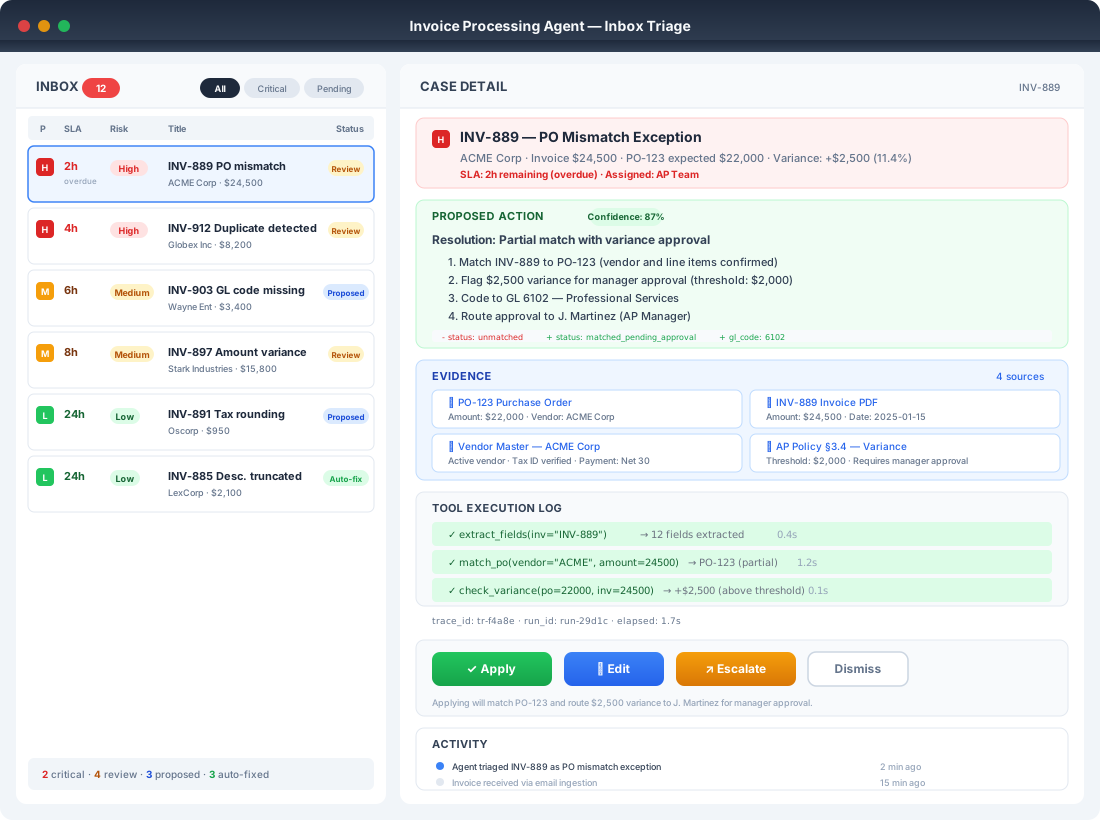
10.6 Pattern: Inbox triage for event-driven work
Intent
Make the agent a triage worker with a clear exception path. Do not make it an invisible daemon.
Inbox triage is fundamentally about protecting momentum. When exceptions accumulate without resolution, users feel stuck. When the queue moves but context is lost, the next handler starts from scratch. Good inbox UX maintains momentum by surfacing the right cases at the right time, preserving context across handoffs, and making progress visible.
Figure 9.7 — Inbox triage UI anatomy
flowchart LR
  subgraph Inbox[List view]
    I1[Ticket/Case list<br/>priority, SLA, risk flags]
  end

  subgraph Detail[Detail view]
    D1[Summary + proposed action]
    D2[Evidence + citations]
    D3[Plan / steps + tool log]
    D4[Controls: apply, edit, escalate, dismiss]
  end

  Inbox --> Detail
Caption: Event-driven agents need an inbox so humans can supervise, approve, and handle exceptions.
Lightweight wireframe
+-------------------------+--------------------------------------+
| INBOX                   | CASE DETAIL                           |
|-------------------------|--------------------------------------|
| P1  SLA  Risk  Title    | Proposed action:                      |
| H   2h   High  Invoice  | - Match PO 123 to Inv 889             |
| M   6h   Med   Ticket   | - Code GL 6102                        |
| L   24h  Low   Ticket   | Evidence: [Doc link] [PO link]        |
|                         | Tool log: retrieve✅ match✅ validate⏳ |
|                         | [Apply] [Edit] [Escalate] [Dismiss]   |
+-------------------------+--------------------------------------+
Polished wireframe
What to test
Test deduplication and idempotency to prevent double actions. Run tool failure simulations and verify they route to the recovery path. Confirm SLA escalation triggers correctly.
Worked examples
- IT Service Desk: tickets triaged into auto-fix, approval-needed, or L2 escalation
- Invoice: only exceptions hit the inbox, clean cases process in the background
10.7 Pattern: Exception handling workspace
Failures must be diagnosable and fixable without "restart the conversation".
📚 Related sections: - Production resilience → Chapter 11, §11.5 - State preservation → Chapter 11, §11.5.2 - Failure handling → Chapter 9, §9.6B
Figure 9.8 — Exception recovery flow
flowchart TB
  F[Failure detected] --> T{Failure type}
  T --> R1[Retrieval issue<br/>try alternate source<br/>ask user for doc]
  T --> R2[Tool failure<br/>timeout, auth, rate limit<br/>retry with budget]
  T --> R3[Policy block<br/>explain constraint<br/>route for approval]
  T --> R4[Reasoning mismatch<br/>ask targeted clarification<br/>show assumptions]
  R1 --> S[Resume from saved state]
  R2 --> S
  R3 --> S
  R4 --> S
  S --> Done[Complete or escalate]
Caption: Every failure type should map to a clear user-visible recovery path, with preserved state.
What to test
Verify error taxonomy coverage so every tool error maps to a UI path. Test retry safety to ensure retries cannot duplicate writes. Confirm handoff completeness so escalation includes full context and evidence.
Worked examples
- IT Service Desk: runbook tool down, UI offers cached runbook, route to L2, or retry later
- Contract review: missing attachment, UI requests file and resumes at the same step
10.8 Pattern: Audit and forensics views
Operators and auditors must answer "what happened" quickly.
Figure 9.9 — Audit timeline as a sequence diagram
sequenceDiagram
  participant User
  participant Agent
  participant Runtime
  participant Tools
  participant Audit

  User->>Agent: Request action
  Agent->>Runtime: Plan + proposed tool calls
  Runtime->>Audit: Log autonomy mode + intent
  Runtime->>Tools: Execute (or dry-run) tool calls
  Tools-->>Runtime: Results
  Runtime->>Audit: Log tool inputs/outputs (redacted) + provenance
  Runtime-->>Agent: Continue steps
  Agent-->>User: Preview diff + rationale
  User->>Runtime: Approve commit
  Runtime->>Tools: Commit write
  Runtime->>Audit: Log commit + correlation ID
  Runtime-->>User: Confirmation + link to trace
Caption: Auditing is not an afterthought. It is a first-class UX surface backed by traces and correlation IDs.
What to test
Test completeness by verifying you can reconstruct a run end-to-end. Confirm tamper resistance so entries are immutable and timestamped. Test redaction to ensure sensitive data is masked based on role.
Worked examples
- HR leave: timeline includes balance check, manager approval, HRIS update
- CRM: timeline shows proposed diffs, approval, final write
10.9 End-to-end journey: Invoice exception (example walkthrough)
A visual walkthrough helps readers "feel" the interaction design.
Figure 9.10 — Invoice exception journey map (swimlane)
flowchart LR
  subgraph Ingestion[System]
    A[Invoice received] --> B[Extract fields]
    B --> C[Match PO + vendor]
    C --> D{Exception?}
  end

  subgraph Agent[Agent]
    E[Summarize issue<br/>propose resolution] --> F[Prepare preview diff]
  end

  subgraph Human[Approver]
    G[Review in inbox] --> H{Approve?}
    H -- Edit --> I[Edit proposal]
    I --> G
    H -- Approve --> J[Commit]
    H -- Reject --> K[Escalate / manual handling]
  end

  subgraph Audit[Audit/Trace]
    L[Store provenance<br/>and tool logs]
  end

  D -- Yes --> E
  F --> G
  J --> L
  K --> L
  D -- No --> L
Caption: This single journey illustrates inbox triage, explanation ladder, preview→commit, and auditability.
10.10 UX-owned evaluation layers
Engineering evaluation tells you whether the agent got the right answer. UX evaluation tells you whether the experience earned trust, moved work forward, and left the user willing to come back. Both are necessary. Neither is sufficient alone.
This section introduces a three-layer framework for UX-owned evaluation — Trust, Momentum, and Sentiment — adapted from Wittmayer's work on UX ownership of AI evaluation. It complements the engineering-led evaluation covered in Chapters 6 and 7.
📚 Related sections: - Evaluation foundations → Chapter 6 - Thread-level evaluation → Chapter 7, §7.2 - Online evaluation → Chapter 11, §11.4
10.10.1 The three UX evaluation layers
Table 9.3 — UX evaluation layers
| Layer | Question it answers | What breaks when it fails |
|---|---|---|
| Trust | Does the user believe the agent is working with them? | Users audit everything, verify constantly, disengage |
| Momentum | Does the interaction move work forward? | Users feel stuck, repeat themselves, abandon tasks |
| Sentiment | How is the user feeling right now? | Early warning that trust or momentum is eroding |
Figure 9.11 — UX evaluation layer stack
flowchart TB
  S["Sentiment layer<br/>Diagnostic signal<br/>Frustration, confusion,<br/>satisfaction"] --> M["Momentum layer<br/>Does work move forward?<br/>Thread progress, resolution rate,<br/>context preserved"]
  M --> T["Trust layer<br/>Does the user believe the agent<br/>is working with them?<br/>Intent legibility, evidence quality,<br/>recovery behavior"]
  T --> E["Engineering evaluation<br/>Accuracy, tool correctness,<br/>latency"]
Caption: Sentiment is the early warning. Momentum measures progress. Trust determines whether users stay. Engineering accuracy is the foundation all three layers rest on.
10.10.2 Trust layer: beyond accuracy
Trust is not a binary state — it is a running account that builds with each interaction. Users extend trust when they believe the agent understands what matters to them. Trust accumulates through visible intent, honest limitations, and graceful recovery.
HR Leave example: An employee asks "Can I take unpaid leave next Friday?" The agent retrieves the correct policy, cites the clause, shows remaining balance, and flags that manager approval is required for unpaid leave. Even if the answer is "no", the user trusts the agent because it showed its reasoning and constraints.
Trust evaluation questions:
- Did the agent make its intent visible before acting?
- Did it cite evidence for claims that affect decisions?
- When it failed, did recovery feel supported or abandoned?
10.10.3 Momentum layer: thread-level evaluation
Momentum measures whether the interaction moves work toward resolution. A response can be accurate and trusted but still fail to advance the task — for example, when the agent asks unnecessary clarifying questions or restates what the user already said.
Positive momentum signals: task advances per turn, context carried across handoffs, exceptions resolved without re-entry.
Negative momentum signals: user repeats information, circular clarification loops, context lost on escalation, queue stalls without progress.
Implementation: Evaluate momentum at the thread level, not the response level. A single turn may score poorly on momentum (asking a clarification) while the thread scores well (clarification leads to correct resolution in the next turn).
10.10.4 Sentiment layer: diagnostic, not target
Sentiment captures how the user feels during the interaction. It serves as an early warning system: rising frustration often signals that trust or momentum is eroding before those layers register a failure.
Key principle: Sentiment is diagnostic, not a target. Optimizing for sentiment directly can mask real issues — an agent that is unfailingly polite but procedurally wrong will score well on sentiment while trust and momentum collapse. Use sentiment to detect problems, then investigate the underlying trust or momentum failure.
Sentiment trajectory matters more than point-in-time scores. A user who starts frustrated but ends satisfied (because the agent recovered well) is a different signal from one who starts satisfied and ends frustrated (because the agent lost context).
10.10.5 What to test (harness hooks)
Table 9.4 — Evaluator types by UX layer
| Layer | Evaluator type | What it measures | Example |
|---|---|---|---|
| Trust | LLM-as-judge | Intent visibility, evidence quality | "Did the response cite a policy source for the claim?" |
| Trust | Rule-based | Provenance presence | Assert citation count > 0 for policy questions |
| Momentum | Thread-level LLM judge | Progress per turn | "Did this turn advance the task toward resolution?" |
| Momentum | Rule-based | Context preservation | Assert handoff payload includes prior thread context |
| Sentiment | LLM-as-judge | Frustration/confusion signals | "Does the user's language suggest confusion or frustration?" |
| Sentiment | Trajectory analysis | Trend over conversation | Compare sentiment scores at turn 1 vs. final turn |
10.11 Dynamic UX patterns enabled by reasoning models
Reasoning-capable models can generate and adapt UI structures at runtime. This creates powerful experiences, but only if you constrain them with contracts.
Table 9.2 — Dynamic UX capabilities and constraints
| New UX capability | Enabling model capability | Constraints needed | Example agent |
|---|---|---|---|
| On-the-fly form generation | extract fields from natural language | schema whitelist, validation, review | HR leave, Scheduling |
| Conversational → structured pivot | detect when to switch modalities | explicit "switch" affordance, state carryover | IT helpdesk triage |
| Adaptive clarification | ask targeted questions based on uncertainty | question budget, avoid loops | Invoice exceptions |
| Role-sensitive views | tailor outputs by role and access | RBAC, redaction rules | Contact centre supervisor vs agent |
| What-if simulation panels | reason about alternatives | sandboxed simulation tools | Scheduling, IT change planning |
| Dynamic exception recovery | propose repair actions | compensation playbooks, approval gates | CRM, IT |
| Inline documentation and help | contextual explanations | truth constraints, versioned docs | all |
Practical caveat
Dynamic UI should be generated from a constrained component set and schemas. Do not let the model invent new action types or bypass approval logic.
10.12 Anti-patterns and what to test
Table 9.5 — Anti-pattern to evaluation layer mapping
| Anti-pattern | Layer it breaks | Why evaluation misses it |
|---|---|---|
| Chat-only for high-impact writes | Trust | Single-response accuracy doesn't catch missing preview |
| Hidden autonomy | Trust | User can't assess intent if mode is invisible |
| No provenance | Trust | Correct answer without evidence erodes confidence |
| No recovery path | Momentum | Thread-level context loss isn't visible in response metrics |
| Prompt-only policy enforcement | Trust + Momentum | Behavioral failures need runtime detection |
| Operator UX is an afterthought | All layers | Without traces, no layer can be evaluated post-hoc |
flowchart TB
  classDef card stroke:#2b2b2b,stroke-width:1px,rx:10,ry:10;

  subgraph R1[" "]
    direction LR
    A1["Anti-pattern 1<br/>Chat-only for high-impact writes<br/><br/>Symptom: writes with no<br/>preview, no diff<br/>Test: writes require<br/>Preview→Commit + audit logs"]:::card
    A2["Anti-pattern 2<br/>Hidden autonomy<br/><br/>Symptom: users cannot tell<br/>if agent actually executed<br/>Test: autonomy mode<br/>displayed and stored"]:::card
    A3["Anti-pattern 3<br/>No provenance<br/><br/>Symptom: confident claims<br/>with no sources<br/>Test: rubric requires<br/>citations, fail if missing"]:::card
  end

  subgraph R2[" "]
    direction LR
    A4["Anti-pattern 4<br/>No recovery path<br/><br/>Symptom: tool fails,<br/>user must restart<br/>Test: each failure type<br/>renders recovery UI"]:::card
    A5["Anti-pattern 5<br/>Prompt-only policy enforcement<br/><br/>Symptom: told not to do X,<br/>but still does X<br/>Test: runtime blocks<br/>forbidden actions"]:::card
    A6["Anti-pattern 6<br/>Operator UX is an afterthought<br/><br/>Symptom: no trace view,<br/>no audit timeline<br/>Test: trace and audit views<br/>exist, role-gated"]:::card
  end
Here are the same six anti-patterns, rewritten as HR Leave scenarios so they feel concrete.
Anti-pattern 1: Chat-only for high-impact writes
HR Leave example: Employee: "Cancel my approved leave next Monday and convert it to WFH." Agent: "Done."
What's wrong: This can change payroll/attendance, manager approvals, and policy compliance. The user sees no proposed changes.
What to test
The agent must show a preview with leave dates affected, leave balance impact, approver chain, and resulting status changes. It must require commit or approval for actions like cancel, backdate, or unpaid leave conversion. The system must produce an audit link and trace ID after commit.
Anti-pattern 2: Hidden autonomy
HR Leave example: Employee: "Apply annual leave for 12–14 Feb." Agent replies with a plausible confirmation. It is unclear if it actually submitted in Workday/SAP SuccessFactors or just drafted it.
What to test
The UI must clearly show mode: Draft only, Submit with approval, or Auto-submit. "Executed" states must include tool call success, request ID, timestamp, and who approved. If the tool failed, it must show "Not submitted" explicitly.
Anti-pattern 3: No provenance
HR Leave example: Employee: "Can I carry forward 7 days of annual leave?" Agent: "Yes, you can carry forward 7 days."
What's wrong: Policy varies by country, union agreement, seniority, or contract type.
What to test
The response must cite the policy clause (document and section) and effective date. If policy retrieval is missing or ambiguous, the agent must say so and either ask a clarifying question or escalate. The rubric should fail answers that assert policy without a source.
Anti-pattern 4: No recovery path
HR Leave example: Employee: "Submit sick leave for yesterday, attach MC." Tool fails: HRIS timeout, attachment upload error, or entitlement lookup fails. User is forced to start over and re-upload.
What to test
The recovery UI must keep state: dates, leave type, uploaded MC, and partial form fields. It must offer targeted actions: Retry, Switch channel (email ticket), Save draft, or Escalate to HR. It must show a clear error category (HRIS down vs validation error vs permissions) and next step.
Anti-pattern 5: Prompt-only policy enforcement
HR Leave example: Employee: "Please apply compassionate leave for my friend." Policy requires immediate family only. The agent "helpfully" submits anyway because the prompt asked it to be helpful.
What to test
Runtime enforcement must block forbidden actions regardless of model output. Guardrails must check eligibility, required documentation, and role/region constraints before submit. The system must produce a denial reason plus a safe alternative (such as annual leave, unpaid leave, or HR ticket).
Anti-pattern 6: Operator UX is an afterthought
HR Leave example: HR helpdesk gets a complaint: "My leave was cancelled without my approval." There is no trace view to see who triggered what, which tools were called, whether an approval existed, or what policy was used.
What to test
The operator console must show a timeline of events, tool calls, approvals, policy sources, and correlation IDs. Access must be role-gated (HR vs manager vs employee). It must offer one-click export for investigation (audit log, request IDs, evidence links).
BAD: Chat-only write (no Preview→Commit)           GOOD: Preview → Commit (diff, evidence, approval)
+--------------------------------------+          +-----------------------------------------------+
| Chat                                 |          | Case: CRM Update (Execute-with-approval)      |
|--------------------------------------|          |-----------------------------------------------|
| User: Update CRM stage to Qualified  |          | Proposed change (Preview)                      |
| Agent: Sure, I updated the CRM.      |          | - Account: ACME Corp                           |
|                                      |          | - Field diff:                                  |
| (No diff shown)                      |          |     Stage:  Prospect  →  Qualified             |
| (No evidence shown)                  |          |     Owner:  Sam Lee   →  Sam Lee               |
| (No approval step)                   |          | Evidence:                                      |
|                                      |          | - Call summary #1842 (link)                    |
| Result: user cannot verify change    |          | - Opportunity notes (link)                     |
+--------------------------------------+          |-----------------------------------------------|
                                                   | Controls:                                      |
                                                   | [Approve]  [Edit]  [Reject]                    |
                                                   | After approval:                                |
                                                   | Commit status: ✅ Written to CRM + Audit log    |
                                                   +-----------------------------------------------+
flowchart LR
  classDef bad stroke:#2b2b2b,stroke-width:1px,rx:10,ry:10;
  classDef good stroke:#2b2b2b,stroke-width:1px,rx:10,ry:10;

  subgraph L["BAD: Chat-only write"]
    direction TB
    B1["Chat<br/><br/>User: Update CRM stage<br/>Agent: Sure, I updated the CRM.<br/><br/>Missing:<br/>- Diff<br/>- Evidence<br/>- Approval<br/>- Audit link"]:::bad
    B2["Outcome: user cannot verify<br/>what changed. High-impact<br/>write executed invisibly"]:::bad
  end

  subgraph R["GOOD: Preview to Commit"]
    direction TB
    G1["Preview panel<br/><br/>Proposed diff:<br/>Stage: Prospect → Qualified<br/>Owner: Sam Lee → Sam Lee<br/><br/>Evidence links:<br/>- Call summary #1842<br/>- Opportunity notes"]:::good
    G2["Controls<br/>Approve | Edit | Reject"]:::good
    G3["Commit result<br/>Write executed<br/>Audit log + trace link stored"]:::good
  end

L -->|"Fix: Split propose from apply"| RBAD: Failure forces restart GOOD: Typed error + recovery + preserved state
+--------------------------------------+ +------------------------------------------------+
| Chat | | Case: Invoice Exception |
|--------------------------------------| |------------------------------------------------|
| User: Match invoice INV-889 to PO | | Step 2/4: Match PO and vendor |
| Agent: Hmm, something went wrong. | | Status: ❌ Tool failure (timeout) |
| Try again? | |------------------------------------------------|
| | | What happened |
| (No error type) | | - Matching service timed out after 30s |
| (No saved progress) | | - No writes were committed |
| (No recovery options) | |------------------------------------------------|
| | | Recovery options |
| User must restart from scratch | | [Retry] [Use alternate source] [Escalate to L2] |
+--------------------------------------+ |------------------------------------------------|
+---->| Preserved state |
| | - Extracted fields ✅ |
| | - Retrieved docs ✅ |
| | Resume from Step 2 without re-upload |
| +------------------------------------------------+
flowchart LR
  classDef bad stroke:#2b2b2b,stroke-width:1px,rx:10,ry:10;
  classDef good stroke:#2b2b2b,stroke-width:1px,rx:10,ry:10;

  subgraph L["BAD: Restart-the-conversation failure"]
    direction TB
    B1["Chat<br/><br/>Agent: Something went wrong.<br/>Try again?<br/><br/>Missing:<br/>- Error type<br/>- Recovery choices<br/>- Saved progress<br/>- Retry guarantees"]:::bad
    B2["Outcome: user restarts,<br/>duplicates work,<br/>risks duplicated writes"]:::bad
  end

  subgraph R["GOOD: Exception workspace"]
    direction TB
    G1["Typed failure<br/>Tool failure: timeout<br/><br/>Impact:<br/>- No writes committed<br/>- Safe to retry"]:::good
    G2["Recovery actions<br/>Retry | Alternate source<br/>| Escalate"]:::good
    G3["Preserved state<br/>Resume from Step 2<br/>Docs retrieved<br/>Fields extracted"]:::good
  end

L -->|Fix: Map error → UI recovery path| R10.13 Design checklist (ship-ready)
Surface and workflow
- [ ] Primary surface matches trigger type (human, event, schedule)
- [ ] Case state model is explicit (draft, pending, approved, executed, failed)
- [ ] Long-running approvals use workflow orchestration, not chat history
Autonomy and control
- [ ] Autonomy mode is visible and switchable
- [ ] Preview then commit for every write
- [ ] Kill switch, pause, and escalation exist for operators
Legibility
- [ ] Explanation ladder exists (inline, expandable, trace)
- [ ] Provenance is visible for key claims and actions
- [ ] Users can see "what changed" as a diff for writes
Recovery
- [ ] Typed failure categories map to clear UI recovery paths
- [ ] Undo or compensation exists for each write action class
- [ ] Human handoff carries full context and evidence
Harness hooks
- [ ] Golden suites cover UI-critical behaviors (approvals, preview, provenance)
- [ ] Red-team suite includes injection and overreach attempts
- [ ] Shadow mode captures override rates and failure taxonomy
- [ ] Release gates map to autonomy upgrades (suggest-only → approval → auto)
10.13.1 UX evaluation by product maturity
Not every stage of product development needs the same evaluation cadence or focus. Scale your UX evaluation effort to match where you are.
Table 9.6 — UX evaluation by product maturity
| Stage | Cadence | Primary focus | Key activities |
|---|---|---|---|
| Development | Daily | Trust layer | Dogfooding sessions, building trust evaluators, reviewing agent intent visibility |
| Beta | Daily syncs | Momentum layer | Live conversation review, pattern surfacing, identifying where users get stuck |
| Scale | Weekly | All layers | Dashboards, automated detection, trend analysis across layers |
At scale, UX evaluation follows a continuous loop:
- Detection — dashboards surface anomalies (sentiment drops, momentum stalls, trust erosion patterns)
- Investigation — review sampled conversations to identify root cause
- Prioritization — map findings to the layer they affect and triage with product and engineering
- Validation — confirm fixes improve the target layer without regressing others
10.14 Bridge to Chapter 11: From prototype to production
A prototype proves usefulness. A production agent earns trust.
To scale beyond pilots, treat UX controls as part of the safety system. Turn UX failure modes into harness tests. Earn autonomy with evidence, then lock it behind release gates.
📜 Coming up: - Production deployment patterns → Chapter 11 - Rollout and canary strategies → Chapter 11, §11.2 - Observability and monitoring → Chapter 11, §11.4
Reference map
Legend (topics):
- Fit Gate = "Don't ship an agent when a form works"
- Surface = Trigger → Surface taxonomy (chat, sidecar, wizard, inbox, dashboard)
- Autonomy = autonomy modes, approvals, human supervision
- Preview→Commit = propose vs apply, diffs, approvals, audit log
- Explain = explanation ladder, transparency, expectation-setting
- Prov = provenance, citations, disclosure
- Inbox = triage queues, escalation
- Recovery = exception workspace, interrupt/resume, preserved state
- Audit = trace, audit timeline, operator views
- Anti-patterns = the six anti-patterns and tests
- UX Eval Layers = trust, momentum, sentiment evaluation framework
- AX = Agent Experience design discipline (Maeda), successor to UX for non-deterministic systems
- Mixed-Initiative = human-agent handoff design, proactive pausing, deliberation patterns
- AX Vocab = Agent Card, Yocco lifecycle patterns, player/coach/referee roles
A) Foundations: Human–AI interaction and UX principles
| Category | Author / org | What it covers for Chapter 10 (UX angle) | Chapter 10 topics | Primary sources |
|---|---|---|---|---|
| Foundations | Microsoft Research (Saleema Amershi et al.) | Human–AI interaction guidelines: transparency, control, feedback, error recovery, expectation-setting | Explain, Recovery, Autonomy, Anti-patterns | "Guidelines for Human-AI Interaction" (ACM) link Guideline cards PDF link |
| Foundations | Google PAIR (People + AI Research) | Practical UX playbook: mental models, trust, calibration, feedback loops, human-in-loop | Fit Gate, Surface, Explain, Autonomy | PAIR Guidebook link |
| Foundations | Nielsen Norman Group (NN/g) | Error recovery, messaging, usability heuristics that generalize well to agent failures | Recovery, Explain, Anti-patterns | Error-message guidelines link |
B) Major platforms: Copilot and computer-use supervision patterns
| Category | Author / org | What it covers for Chapter 10 (UX angle) | Chapter 10 topics | Primary sources |
|---|---|---|---|---|
| Platform UX | Microsoft (Copilot UX guidance) | Selecting UI approaches for copilots, "dynamic UX" guidance for generative AI | Surface, Sidecar, Explain | Creating a dynamic UX (Microsoft Learn) link |
| Platform UX | Microsoft (Copilot Studio, human supervision) | Human supervision for computer use, review requests, run IDs, auditability | Autonomy, Preview→Commit, Audit, Recovery | Human supervision of computer use (preview) link |
| Platform UX | Google (Gemini API, computer use) | Agent safety and HITL considerations for computer-use agents, sandboxing and input sanitization, UX-visible guardrails | Autonomy, Recovery, Audit | Gemini API "Computer Use" docs link |
C) Frontier labs: Agent building blocks and safety that drive UX constraints
| Category | Author / org | What it covers for Chapter 10 (UX angle) | Chapter 10 topics | Primary sources |
|---|---|---|---|---|
| Frontier labs | OpenAI (Agents docs) | Agent building blocks that map to UX: tool boundaries, monitoring, workflow design | Surface, Sidecar, Audit | Agents guide link |
| Frontier labs | OpenAI (Agent safety guidance) | Prompt injection and tool safety patterns that usually require UX gates and runtime enforcement | Prov, Preview→Commit, Autonomy, Anti-patterns | Safety in building agents link |
| Frontier labs | OpenAI (Human-in-the-loop in SDK) | Pause/resume runs for approvals, foundation for Preview→Commit and human review workflows | Preview→Commit, Autonomy, Recovery | Human in the loop (Agents SDK) link |
| Frontier labs | Anthropic (Building effective agents) | Practical agent patterns: orchestration, tool use, where humans intervene | Fit Gate, Surface, Autonomy, Recovery | Building Effective AI Agents link |
| Frontier labs | Anthropic (Safe and trustworthy agents framework) | Governance and safety framing that supports oversight, monitoring, safe deployment expectations | Autonomy, Audit, Anti-patterns | Framework for safe and trustworthy agents link |
D) Shipped product UX: Embedded copilots, trust signals, escalation, approvals
| Category | Author / org | What it covers for Chapter 10 (UX angle) | Chapter 10 topics | Primary sources |
|---|---|---|---|---|
| Shipped product UX | Slack (Product + design team) | Marking AI involvement, trust signals, adoption-friendly entry points | Surface, Explain, Prov, Anti-patterns | How Slack AI was designed link Slack AI Principles link |
| Shipped product UX | Atlassian (Design System team, Rovo patterns) | Concrete embedded AI patterns: nudges, entry points, contextual actions | Surface, Sidecar, Inbox | AI Rovo patterns (Atlassian Design System) link |
| Shipped product UX | Shopify (Sidekick) | Assistant placement, guided help, content and app generation, extension model | Sidecar, Surface, Explain | Sidekick overview link Sidekick app extensions link |
| Shipped product UX | Intercom (Fin) | Escalation, guidance, consistent behavior, "when to hand off to human" | Inbox, Recovery, Autonomy | Fin Guidance link |
| Shipped product UX | ServiceNow (Now Assist) | Enterprise approvals surfaces and governance workspace patterns | Preview→Commit, Autonomy, Audit | Approvals docs link Implementation insights PDF link |
| Shipped product UX | Salesforce (Agentforce / Einstein Copilot) | Embedded assistant framing and side-panel copilot UX within enterprise suite | Sidecar, Surface | Agentforce Assistant page link Rename release note link |
E) Developer frameworks: UI primitives for tool use, approvals, interrupt/resume
| Category | Author / org | What it covers for Chapter 10 (UX angle) | Chapter 10 topics | Primary sources |
|---|---|---|---|---|
| UI primitives | Vercel (AI SDK) | Streaming tool calls, tool usage UI patterns, approvals and gating ("needsApproval"-like UX) | Preview→Commit, Audit, Sidecar | Chatbot Tool Usage link AI SDK 6 link |
| UI primitives | LangChain (LangGraph) | Interrupt/resume with persisted state, maps directly to exception recovery UX | Recovery, Autonomy, Audit | LangGraph interrupts link |
F) Human-centered design and ethics: Trust, disclosure, adoption, "humans not hype"
| Category | Author / org | What it covers for Chapter 10 (UX angle) | Chapter 10 topics | Primary sources |
|---|---|---|---|---|
| Human-centered | IDEO | Trust and adoption for assistants, disclosure and provenance norms, ethics-by-design workshop methods, "humans not hype" framing that supports your Fit Gate | Fit Gate, Explain, Prov, Anti-patterns | Making AI assistants people will be excited about link A legal and ethical framework for GenAI link AI & Ethics collaborative activities (cards) link IDEO AI Lab link |
| Human-centered | Melissa Wittmayer | Trust/Momentum/Sentiment evaluation framework; UX ownership of experience metrics; implementation by product maturity; thread-level evaluation patterns | UX Eval Layers, Trust, Momentum, Autonomy | "Shaping AI Agent Behavior: Why UX Must Own AI Evaluation Frameworks" Parts 1-3 link |
G) Trust data and adoption research: Industry evidence for trust-first AX design
| Category | Author / org | What it covers for Chapter 10 (UX angle) | Chapter 10 topics | Primary sources |
|---|---|---|---|---|
| Trust data | Deloitte | Only 2.7% of finance professionals trust agents for judgment calls; trust as primary adoption barrier | AX, Autonomy, UX Eval Layers | Deloitte AI in Finance survey (2025) |
| Trust data | Forrester | 54% consumer discomfort with AI data sharing; transparency and disclosure as trust levers | AX, Prov, Explain | Forrester Consumer Trust in AI report (2025) |
| Trust data | Gartner | 40%+ of agentic AI projects predicted canceled or scaled back by 2027; governance and UX as risk mitigators | AX, Autonomy, Anti-patterns | Gartner Agentic AI predictions (2025) |
| AX framing | John Maeda | "Agent Experience" (AX) as successor to UX; design discipline for non-deterministic delegated systems | AX, Surface, Autonomy | Maeda on Agent Experience (2025) |
H) Mixed-initiative interaction and AX design patterns
| Category | Author / org | What it covers for Chapter 10 (UX angle) | Chapter 10 topics | Primary sources |
|---|---|---|---|---|
| Mixed-initiative | CMU (Morae) | Proactive pausing at decision points; agent-initiated handoffs rather than user-initiated interrupts | Mixed-Initiative, Autonomy, Preview→Commit | Morae framework (CMU, 2025) |
| Mixed-initiative | CHI 2025 (Human-AI Deliberation) | Iterative discussion replacing binary accept/reject; structured negotiation between user and agent | Mixed-Initiative, Autonomy, Recovery | Human-AI Deliberation (CHI 2025) |
| Mixed-initiative | IUI 2025 workshop | Consensus on when/how to surface oversight without creating "agentic sludge" | Mixed-Initiative, Autonomy, Anti-patterns | IUI 2025 Mixed-Initiative Workshop |
| AX patterns | WEF (World Economic Forum) | "Agent Card" for capability disclosure; standardized transparency artifact for agent products | AX Vocab, Prov, Explain | WEF Agent Card framework (2025) |
| AX patterns | Joe Yocco | Six-pattern lifecycle: Intent Preview, Action Proposal, Execution Monitoring, Outcome Verification, Correction Affordance, Escalation Pathway | AX Vocab, Preview→Commit, Recovery, Inbox | Yocco agentic design patterns (2025) |
| AX patterns | Salesforce (player/coach/referee) | Agent role model: player (executes), coach (advises), referee (enforces policy); role shifts within workflows | AX Vocab, Autonomy, Surface | Salesforce Agentforce role model (2025) |
| AX direction | Luke Wroblewski | Shift from chat-centric to orchestration-centric interfaces; task queues and progress visualization over conversational polish | AX, Surface, Inbox | Wroblewski on orchestration UX (2025) |
| AX direction | Vitaly Friedman | Orchestration-first design; undo architectures, multi-agent coordination surfaces, progress as primary UX signal | AX, Surface, Recovery, Inbox | Friedman on agentic interface design (2025) |
Key Takeaways
- Agent UX is trust engineering — The primary adoption barrier for agentic AI is not capability but trust; every design decision should be evaluated by whether it makes the agent's behavior more legible, controllable, recoverable, and auditable.
- Choose surfaces by trigger, not by taste — Match the UI to how work arrives (human-initiated, event-driven, or scheduled) and the risk level of the actions, rather than defaulting to a chat box.
- Make autonomy visible and earned — Autonomy modes (suggest-only, execute-with-approval, execute-automatically) must be surfaced to users, switchable at runtime, and promoted or demoted based on evidence such as override rates and incident-free canary periods.
- Split propose from apply — The preview-commit pattern prevents irreversible mistakes by showing diffs, rationale, and evidence before any write is executed, turning agent output into a governed workflow.
- Show your work progressively — The explanation ladder (inline rationale, expandable details, full trace) lets end users, operators, and auditors each get the depth of evidence they need without overwhelming any audience.
- Design recovery, not restarts — Every failure type should map to a typed error with preserved state and concrete recovery options (retry, alternate source, escalate), so users never have to start over from scratch.
- UX must own evaluation beyond accuracy — Engineering metrics (correctness, latency) are necessary but insufficient; UX teams need their own trust, momentum, and sentiment evaluation layers to detect experience failures that accuracy scores miss.
Next → Chapter 11 takes you from prototype to production — wiring UX contracts, evaluation, and safety controls into a dependable operational system.
Reverse index: topic → best citations to attach
Problem Fit Gate (don't ship an agent when a form works): Google PAIR; Anthropic effective agents; IDEO AI Lab and assistant adoption piece
Surface selection (chat vs sidecar vs wizard vs inbox vs dashboard): Microsoft Copilot UX guidance; Google PAIR; Atlassian Rovo patterns; Slack AI design; OpenAI Agents guide
Autonomy and human supervision: OpenAI Human-in-the-loop; Microsoft Copilot Studio human supervision; Anthropic safe agents framework; Gemini computer use docs
Preview → Commit (writes, approvals, diffs, gating): OpenAI Human-in-the-loop; Vercel AI SDK tool usage; ServiceNow approvals; OpenAI agent safety guidance
Explanation ladder (transparency, expectation-setting, calibration): Microsoft Research Human-AI guidelines; Google PAIR; Slack AI design
Provenance and disclosure (citations, source-of-truth cues): OpenAI agent safety guidance; Slack AI principles; IDEO legal/ethical framework
Inbox triage and escalation: Intercom Fin guidance; Atlassian Rovo patterns; ServiceNow approvals
Exception recovery (typed errors, preserve state, resume): Microsoft Research guidelines; LangGraph interrupts; Microsoft human supervision; NN/g error messaging
Audit and forensics views (traces, run IDs, operator UX): OpenAI Agents guide; Microsoft human supervision; Vercel AI SDK; Anthropic safe agents framework
Anti-patterns and what to test: OpenAI agent safety guidance; Microsoft Research guidelines; IDEO ethics activities; NN/g error guidelines; Slack AI principles
UX-owned evaluation (trust, momentum, sentiment layers): Wittmayer evaluation framework; thread-level evaluators; LangSmith LLM-as-judge
Trust as adoption barrier (industry evidence): Deloitte AI in Finance; Forrester Consumer Trust; Gartner Agentic AI predictions
Mixed-initiative interaction (handoff design, proactive pausing): CMU Morae; CHI 2025 Human-AI Deliberation; IUI 2025 mixed-initiative workshop
AX design vocabulary (Agent Card, lifecycle patterns, agent roles): Maeda AX framing; WEF Agent Card; Yocco six-pattern lifecycle; Salesforce player/coach/referee; Wroblewski and Friedman on orchestration-centric interfaces